 how-to
Security System Maintenance Tips for Businesses
Table of Contents
- Why Regular Security System Maintenance Matters
- Security Alarm System Servicing Frequency and Testing Protocols
- Commercial CCTV Maintenance Checklist
- Access Control and Hardware Longevity
- Queensland Privacy Laws for Business Surveillance
- DIY Maintenance vs. Professional Servicing: When to Call the Experts
- Creating a Preventative Maintenance Schedule
- Frequently Asked Questions
Last Updated: September 28, 2026
Why Regular Security System Maintenance Matters
A functioning security system is only as good as its last maintenance check. Many business owners treat security infrastructure like a set-it-and-forget-it investment, then wonder why their alarm doesn't respond or their CCTV footage is grainy when they need it most.
The reality is simple: security system maintenance prevents costly failures. A camera with a dirty lens misses details. A sensor that hasn't been calibrated drifts out of alignment. An access control system running outdated firmware becomes vulnerable to breach attempts. None of these problems announce themselves until something goes wrong.
Preventative maintenance helps businesses avoid false alarms that waste emergency response time, cameras that fail during critical incidents, and access logs that don't hold up under audit. The cost of fixing these problems after the fact can exceed the cost of regular servicing.
This guide covers the practical steps to keep your security infrastructure working reliably. We'll walk through testing protocols, environmental challenges specific to the region, and the exact threshold for when you should call a professional instead of handling maintenance yourself.
Security Alarm System Servicing Frequency and Testing Protocols
Alarm systems need regular testing to remain reliable. A system that hasn't been tested is a system you can't trust. Testing reveals which sensors are drifting, which connections are loose, and which zones aren't communicating properly with the monitoring centre.
Monthly and Quarterly Checks
Monthly checks are the foundation of alarm system maintenance. These are simple tasks you can handle yourself without specialist equipment.
Monthly tasks:
- Walk the perimeter and check that all entry points have sensors
- Verify the control panel displays no fault codes or warning lights
- Test the panic button to confirm it triggers a response
- Check that motion sensors aren't blocked by furniture or new installations
- Inspect wiring for visible damage or corrosion
Quarterly checks go deeper. These require more attention but still fall within DIY territory if you're methodical.
Quarterly tasks:
- Perform a full system test by triggering each zone individually
- Document which sensors respond and how long the signal takes to register
- Confirm backup battery is holding charge (most systems have a battery test function)
- Review the alarm log for any missed triggers or false activations
- Clean sensor lenses with a soft, dry cloth
A common mistake is testing only the main entry points. Businesses forget about loading docks, roof access, or secondary exits. Every zone should be tested equally.
Annual Professional Inspection
Annual professional inspection is where the real work happens. This is where you need someone with proper equipment and training.
What a professional inspection covers:
- Full system diagnostics using specialist testing equipment
- Sensor calibration and sensitivity adjustment
- Battery load testing under actual alarm conditions
- Response time verification with the monitoring centre
- Wiring inspection for hidden corrosion or degradation
- System documentation update and compliance verification
The annual inspection is also when firmware updates get applied and security patches get installed. This is critical, an alarm system running outdated firmware is like running an unpatched computer on the internet. You're exposed to known vulnerabilities.
After the inspection, you should receive a detailed report showing what was tested, what passed, and what needs attention. Keep these reports. They're essential for insurance claims and compliance audits.
Commercial CCTV Maintenance Checklist
CCTV systems fail silently. A camera can stop recording without triggering any alert. You won't know until you need the footage and it isn't there.
Lens and Housing Inspection
Dirty lenses are the most common CCTV problem and the easiest to fix. Dust, pollen, and salt spray accumulate on the lens coating, degrading image quality. A camera that looked sharp six months ago can become nearly useless.
Lens maintenance:
- Inspect the lens for dust, spider webs, or salt buildup
- Clean with a soft microfibre cloth, never use paper towels or your sleeve
- For stubborn buildup, use a lens cleaning solution designed for camera optics
- Check the lens cap and housing seal for gaps that allow moisture in
- Verify the lens isn't fogged from internal condensation
Housing inspection is about preventing water ingress. Even small gaps allow moisture to creep in, corroding internal components and degrading image quality.
Housing checks:
- Examine the weatherproof seal around the lens barrel
- Check cable glands and connectors for cracks or loose fittings
- Verify mounting brackets are tight and haven't shifted
- Look for signs of rust or corrosion on metal housings
- Confirm the drain hole (if present) isn't blocked
Environmental Challenges in the Region
Queensland's climate creates specific maintenance demands. Salt spray in coastal areas accelerates corrosion. High humidity promotes fungal growth on lenses. Intense heat can degrade sealants and cause lens fogging.
Businesses in salt-spray zones need more frequent lens cleaning, often monthly instead of quarterly. Coastal sites also benefit from stainless steel or epoxy-coated housings that resist corrosion better than standard aluminium.
Inland sites face different challenges. Dust storms leave fine particles that settle on lenses. High heat causes thermal stress on seals and can create internal condensation when the system cools at night. Proper ventilation around camera housings helps prevent this.
The key is matching your maintenance schedule to your location. A camera in Ipswich has different needs than one on the Gold Coast. A site near industrial areas faces different dust challenges than a rural property.
Access Control and Hardware Longevity
Access control systems are complex, they involve electronics, mechanical locks, and networked communication. Each component has its own maintenance needs.
Electronic components need firmware updates and security patches just like alarm systems. Outdated access control software is vulnerable to unauthorised access attempts. Updates should be applied annually at minimum, more frequently if security advisories are released.
Mechanical locks need lubrication and inspection. A deadlock that's been in place for three years may have internal wear that makes it easier to pick or bypass. Annual inspection by a locksmith identifies locks that need replacement before they fail.
Card readers and biometric sensors accumulate dirt and fingerprints. A reader that's hard to use gets bypassed, people prop doors open or share credentials. Regular cleaning keeps the system functional and ensures people actually use it.
Network connectivity is where cyber-physical security meets access control. A system that's not regularly patched is vulnerable. A system with weak passwords can be compromised remotely.
Queensland Privacy Laws for Business Surveillance
Surveillance systems create data. That data is protected under Australian privacy law, and Queensland businesses have specific compliance obligations.
Key compliance points:
- Inform people they're being recorded (signage at entry points)
- Retain footage only as long as necessary for the stated purpose
- Restrict access to footage to authorised personnel only
- Dispose of footage securely when retention period expires
- Document your retention policy and stick to it
DIY Maintenance vs. Professional Servicing: When to Call the Experts
Not all maintenance is DIY work. Knowing the boundary between what you can handle and what requires a professional prevents costly mistakes.
DIY maintenance is appropriate for:
- Visual inspections and cleaning
- Testing basic system functions
- Documenting what you observe
- Replacing batteries in wireless sensors
- Applying firmware updates (if you're technically confident)
Professional servicing is required for:
- Sensor calibration and sensitivity adjustment
- Electrical diagnostics and testing
- Access control programming and credential management
- Firmware updates to security-critical systems
- Compliance verification and documentation
Creating a Preventative Maintenance Schedule
A maintenance schedule is only useful if you actually follow it. The best schedule is one that fits your operation and gets done consistently.
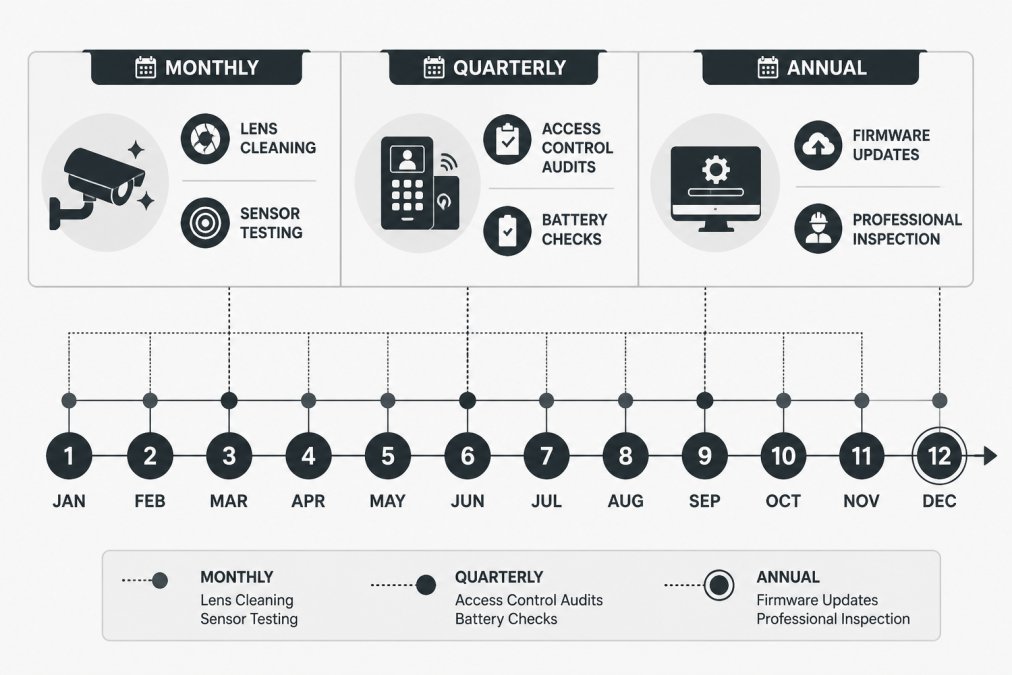
Start by documenting your system:
- List every component: alarms, cameras, access control readers, locks, batteries
- Note the manufacturer and model for each
- Record installation dates and warranty expiration
- Identify which components are critical vs. nice-to-have
Documentation and Audit Trails
Documentation matters for three reasons:
First, it proves you're maintaining the system if something fails. Insurance companies ask for maintenance records. Compliance audits require them. A detailed log shows you're taking security seriously.
Documentation should include:
- Date of maintenance
- What was checked or serviced
- Results and any issues found
- Parts replaced or updated
- Next scheduled maintenance date
- Name of person who performed the work
Firmware Updates and Security Patches
Firmware updates are security maintenance. A system running outdated firmware is vulnerable to known exploits.
Update strategy:
- Check manufacturer websites quarterly for security advisories
- Apply critical security patches immediately
- Apply routine updates during scheduled maintenance windows
- Document all updates in your maintenance log
- Test the system after updates to confirm nothing broke
Frequently Asked Questions
How often should commercial alarm systems be serviced?
Commercial alarm systems should be tested monthly by staff to verify sensor operation and alert response. A professional security alarm system servicing should occur at least annually, though systems in high-traffic or harsh environments may need servicing twice yearly. Battery backup systems require testing every three to six months to ensure reliability during power failures. Regular servicing maintains system uptime and compliance with insurance requirements.
What are the legal requirements for CCTV signage and privacy in Queensland businesses?
Queensland privacy laws for business surveillance require clear, visible signage informing employees and visitors that CCTV is in operation. The Privacy Act 1988 (Cth) and state workplace laws govern how footage is stored, accessed, and retained. Businesses must have a legitimate purpose for surveillance, limit recording to necessary areas, and protect footage from unauthorised access. Data encryption and access control can help comply with privacy obligations and protect security infrastructure.
What are the most common signs that a security camera system needs repair?
Watch for image distortion, colour degradation, or complete signal loss on IP cameras. Moisture inside lens housings indicates seal failure and requires immediate attention in humid climates. If night vision or thermal imaging functions degrade, sensor calibration or hardware replacement may be needed. Intermittent connectivity issues, slow remote monitoring response, or gaps in incident reporting suggest network security problems or firmware corruption requiring professional troubleshooting.
Can I perform basic security system maintenance myself, or should I hire professionals?
Basic tasks like visual inspection, lens cleaning, and monthly alarm testing can be handled internally if staff are trained. However, firmware updates, security patches, sensor calibration, battery backup testing, and access control audits require professional expertise to avoid system vulnerabilities. Compliance documentation and threat detection analysis can be performed by licensed operators to meet regulatory standards and insurance requirements. Mixing DIY maintenance with professional servicing ensures both operational efficiency and legal compliance.