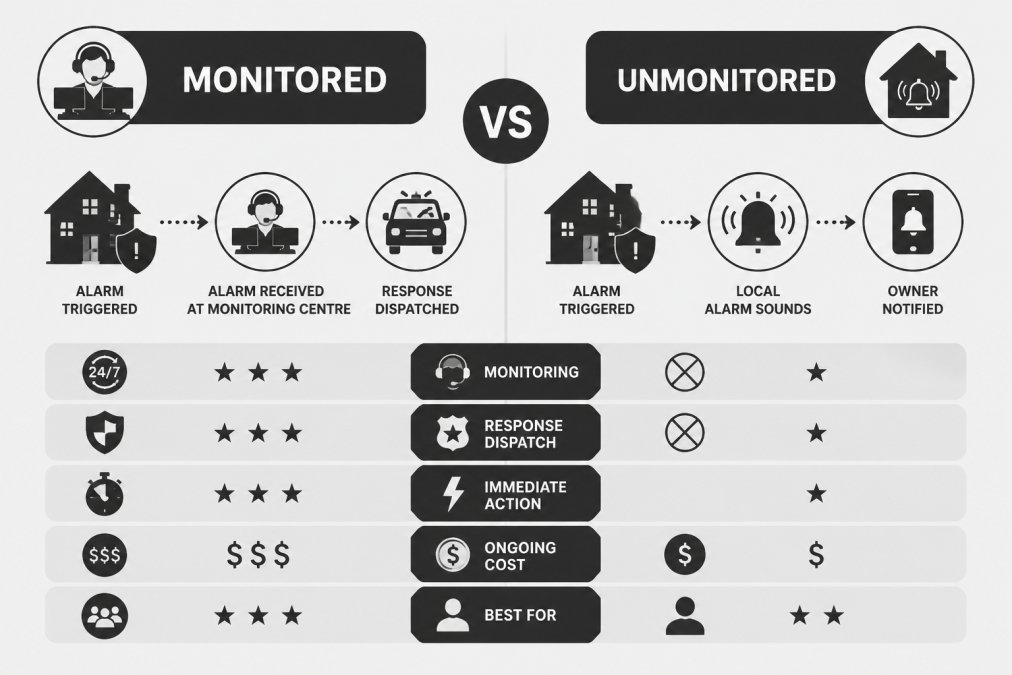
 comparison
Monitored vs Unmonitored Security Alarms: Key Differences
Table of Contents
- Monitored vs Unmonitored Security Alarms: The Core Differences
- How Monitored and Unmonitored Systems Work
- Self-Monitored Alarm System Pros and Cons
- 24/7 Alarm Response Times and Emergency Dispatch
- AS/NZS 2201 Security Standards and Compliance
- Cost Comparison: Monthly Fees vs Upfront Costs
- Insurance, Privacy, and Legal Requirements
- Which System Fits Your Property? A Decision Guide
- Frequently Asked Questions
Last Updated: September 15, 2026
Monitored vs Unmonitored Security Alarms: The Core Differences
The difference between monitored and unmonitored security alarms comes down to one question: who responds when the siren sounds? A monitored system sends its alarm signal to a professional monitoring centre that verifies the event and coordinates emergency dispatch, while an unmonitored system alerts only you through a siren, app notification, or both. That distinction shapes monthly costs, response times, insurance eligibility and legal obligations. This guide from Tupper Security breaks down how each option performs in practice, what the standards require, and which setup suits your property.
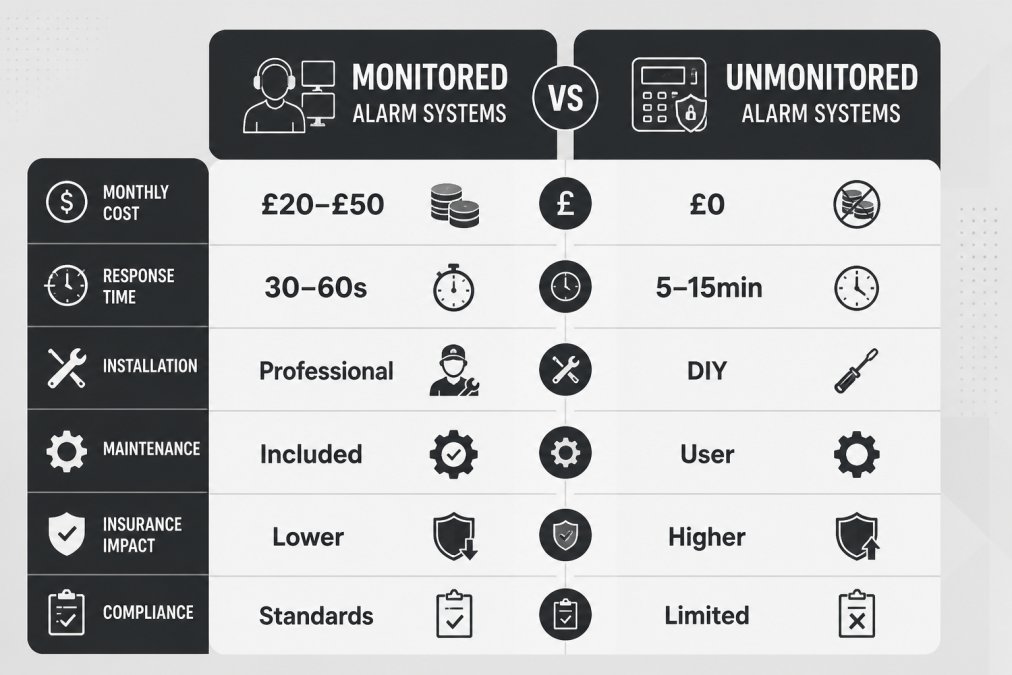
What Is a Monitored Security System?
A monitored security system is connected to a professional monitoring centre that watches for alarm signals around the clock and coordinates a response. When a sensor trips, the panel transmits an alarm signal over a phone line, internet connection, or cellular backup to a centralised control room.
The monitoring centre then attempts verification, contacting you or a nominated keyholder before escalating to police or emergency services. This filters false alarms, which is exactly what police services want before they dispatch a patrol.
What Is an Unmonitored (Self-Monitored) Security System?
An unmonitored security system is one where you are the monitoring centre. Sensors and cameras send real-time notifications to your mobile application, and any response is your responsibility.
DIY kits dominate this category: you install the sensors, pair them with an app, and manage alerts as they arrive. There is no monthly subscription unless you opt into cloud storage or premium features, and no third party is watching your property while you sleep. The trade-off: if your phone is on silent at 2 AM, nobody is responding.
How Monitored and Unmonitored Systems Work
Monitored systems operate on a signal chain: sensor triggers, panel transmits, monitoring centre receives, operator verifies, then dispatch occurs. Self-monitored systems shorten that chain, sensor to hub to your phone, and stops there. The real difference emerges when something fails.
The signal path, step by step
A professionally monitored panel transmits over a primary path (broadband or phone line) with cellular backup as a secondary. If the primary path drops, the panel fails over to cellular automatically and the monitoring centre still receives the signal. Most reputable panels also send a periodic test signal, often every 24 hours, so the control room knows the panel is alive; if that heartbeat stops, the centre can flag a communication failure and contact you or a keyholder.
A self-monitored hub usually relies on your home broadband and a Wi-Fi or proprietary wireless link to the sensors. If the broadband drops, the hub may still trigger a local siren, but the push notification does not arrive until the connection is restored. Some DIY hubs offer cellular or Ethernet backup, but often as an optional add-on rather than a default.
What happens during an internet outage
| Scenario | Monitored system | Unmonitored system |
|---|---|---|
| Broadband drops | Panel fails over to cellular; monitoring centre still receives alarm | Hub loses cloud connection; local siren may still sound, but no push notification |
| Cellular also unavailable | Panel stores event and transmits when signal returns; some panels have dual-SIM | No remote alert at all until connectivity returns |
| Router unplugged by intruder | Cellular path unaffected | Hub goes offline; you may not know until you check the app |
Self-monitored users often only discover their hub was offline when they review the app days later. Some hubs send an offline notification, but many do not, and that notification depends on the very connection that just failed.
What happens during a power failure
Both system types should run on battery backup, but duration and behaviour differ. A professionally monitored panel typically carries a 24-hour standby battery as a minimum under AS/NZS 2201, and the monitoring centre is alerted if the panel switches to battery or the battery is failing (store.standards.org.au). A DIY hub may have a rechargeable battery rated for a handful of hours; once it depletes, the system is offline, no siren, no notification, no record.
Wireless sensors run on batteries, and a flat sensor battery is the most common cause of a silent gap in coverage. Monitored systems usually report low-battery status to the control room, prompting a maintenance call. Self-monitored systems rely on you noticing an in-app warning, and if you have muted notifications, you will not.
Sensor and device failure
A monitored system with a dead sensor is no safer than an unmonitored one with a flat battery. The difference is who notices. Professional monitoring includes supervision: the panel polls its sensors and reports faults. Self-monitoring puts that responsibility on you, and most users do not run weekly walk tests.
Smart home integration and where it fits
Smart home integration links cameras, doorbells, lighting, and locks into one interface, and customisable activity zones cut nuisance alerts from traffic or pets. Both monitored and unmonitored systems can integrate with Amazon Alexa, Google Home, and Apple HomeKit, but depth varies. Professional-grade panels often expose fewer third-party hooks by design, prioritising reliability and compliance over convenience. DIY ecosystems integrate more broadly but depend on the same home network that fails during an outage.
The practical takeaway: do not compare the two models on a good day. Compare them on the day the broadband drops, the power fails, or a sensor battery dies at 2 AM. That is when the difference between monitored and unmonitored actually shows up.
Self-Monitored Alarm System Pros and Cons
Self-monitored alarm system pros and cons usually get reduced to cost versus peace of mind, but the picture is more nuanced.
Pros:
- No ongoing monthly fees, so the system is effectively subscription-free after purchase
- Easy DIY installation with wireless sensors that need no hardwiring
- Full remote access through the mobile application, including live camera feeds
- No lock-in contracts, which suits renters and frequent movers
The most common mistake with self-monitoring is treating a notification as a response. An alert that sits unread on a locked phone at 3 AM is not incident management, it is a log entry. If you travel frequently or sleep deeply, self-monitoring leaves a genuine gap in coverage.
24/7 Alarm Response Times and Emergency Dispatch
AS/NZS 2201 Security Standards and Compliance
Cost Comparison: Monthly Fees vs Upfront Costs
| Factor | Monitored System | Unmonitored System |
|---|---|---|
| Upfront hardware | Higher, professional-grade panel | Lower, DIY kit |
| Installation | Professional, included in quote | Self-installed, no labour cost |
| Ongoing fees | Monthly subscription applies | $0/month on free tiers |
| Cellular backup | Usually included | Often an add-on |
| Maintenance | Provider-scheduled | Owner-managed |
| Insurance impact | May satisfy insurer requirements | Rarely recognised |
Insurance, Privacy, and Legal Requirements
How insurers actually assess your alarm
The practical consequences vary by policy and premises type:
If your insurer confirms a monitored alarm is required, ask them to specify the standard (for example, AS/NZS 2201) and whether they require a monitoring centre that operates to that standard. This prevents a situation where you install a monitored system that still does not satisfy the policy wording.
Privacy and data handling
Legal and police dispatch requirements
Verification can take several forms:
The insurance and legal angles are where the monitored versus unmonitored decision stops being about monthly cost. A self-monitored system that saves you a subscription fee but fails an insurer's requirement or never generates a verified police dispatch is not a saving, it is an uncovered risk.
Which System Fits Your Property? A Decision Guide
Frequently Asked Questions
What is the difference between monitored and unmonitored security alarms?
A monitored alarm connects to a professional monitoring centre that receives signals 24/7 and coordinates emergency dispatch. An unmonitored system sends alerts directly to your phone or siren, leaving you to verify and respond. The core difference is who takes action when the alarm triggers: a trained operator or you. This affects response times, reliability during emergencies, and ongoing costs.
Is it worth paying for a professional alarm monitoring service?
Professional monitoring is worth it if you want guaranteed 24/7 coverage, faster emergency response, and potential insurance discounts. It suits homeowners who travel, businesses with valuable stock, and properties in areas with higher break-in risk. If you are home often and comfortable responding to alerts yourself, self-monitoring can work. The decision often comes down to how much you value having someone else handle the 2 AM alarm.
Can I self-monitor my security system using a smartphone app?
Yes. Many modern systems offer self-monitoring through a mobile app with real-time notifications, video verification, and remote access. You receive alerts when sensors trigger and can view live or recorded footage to decide whether to call emergency services. The trade-off is that you must be available to respond, and you lose the backup of a professional monitoring centre if you miss an alert.
What happens when an unmonitored alarm is triggered?
When an unmonitored alarm triggers, the siren sounds and a notification is sent to your phone or nominated contacts. No one is automatically dispatched. You must verify the alert via camera or by attending the property, then call emergency services if needed. If you are asleep, in a meeting, or have poor mobile reception, the alarm may go unanswered. This delay is the main drawback compared to professional monitoring.
Are there specific Australian standards for alarm monitoring centres?
Yes. AS/NZS 2201.1:2007 sets the requirements for alarm monitoring centres, covering alarm signal handling, operator training, and dispatch procedures. AS/NZS 2201.2 covers monitoring centre operations. Choosing a provider that complies with these standards ensures your alarm signals are handled consistently and that emergency services are contacted appropriately. Ask your security provider whether their monitoring centre holds current certification.