 ultimate-guide
Average Cost of a Home Security System in Australia
Table of Contents
- What Drives the Average Cost of a Home Security System in Australia
- Security Camera Installation Cost: What You Are Actually Paying For
- Home Alarm Monitoring Fees and Subscription Models Explained
- DIY vs Professional Security Systems: The Real Cost Difference
- Total Cost of Ownership: What the First Quote Does Not Show
- Privacy, Data Storage and Smart Home Integration Costs
- Conclusion: Getting an Accurate Quote for Your Property
- Frequently Asked Questions
Last Updated: September 26, 2026
What Drives the Average Cost of a Home Security System in Australia
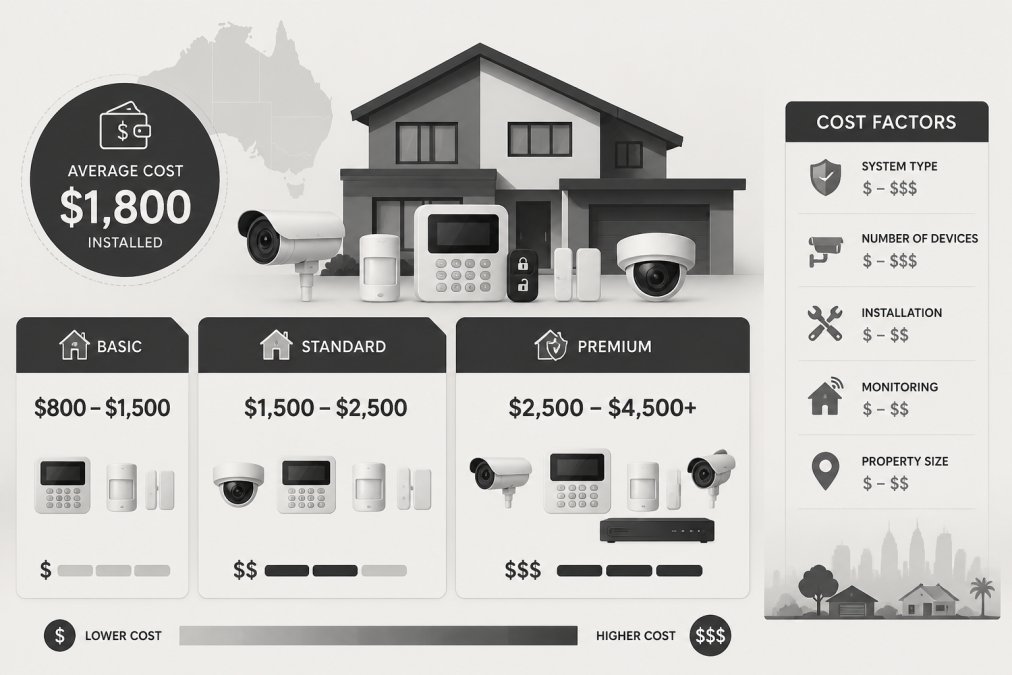
The average cost of a home security system in Australia is not a single figure, because a home security system cost is really a bundle of separate prices: hardware, installation, monitoring, and maintenance. This guide from Tupper Security breaks down what each of those layers actually contains, so you can read a quote with a clear head instead of guessing.
Most homeowners only ever see the headline number. The real differences hide in the fine print: contract length, whether the panel talks to a back-to-base monitoring service, and how much of the install you do yourself. Below, we walk through each cost driver and show where the money genuinely goes.
Hardwired vs Wireless: How Property Requirements Change the Price
The single biggest technical driver of price is whether your home is hardwired or wireless. A hardwired system runs cabling through the walls to each sensor and camera, which suits a property being built or renovated. Wireless systems use Wi-Fi connectivity and battery-powered sensors, which means far less labour but a higher hardware cost per device.
Older Queenslanders and brick homes often have awkward cavity access, so a hardwired retrofit can take longer than a new build. A site inspection is the only reliable way to know which route your property allows.
| Factor | Hardwired | Wireless |
|---|---|---|
| Upfront hardware | Lower per device | Higher per device |
| Installation labour | Higher | Lower |
| Best for | New builds, renovations | Established homes, rentals |
| Battery backup | Mains-backed | Battery reliant |
Security Camera Installation Cost: What You Are Actually Paying For
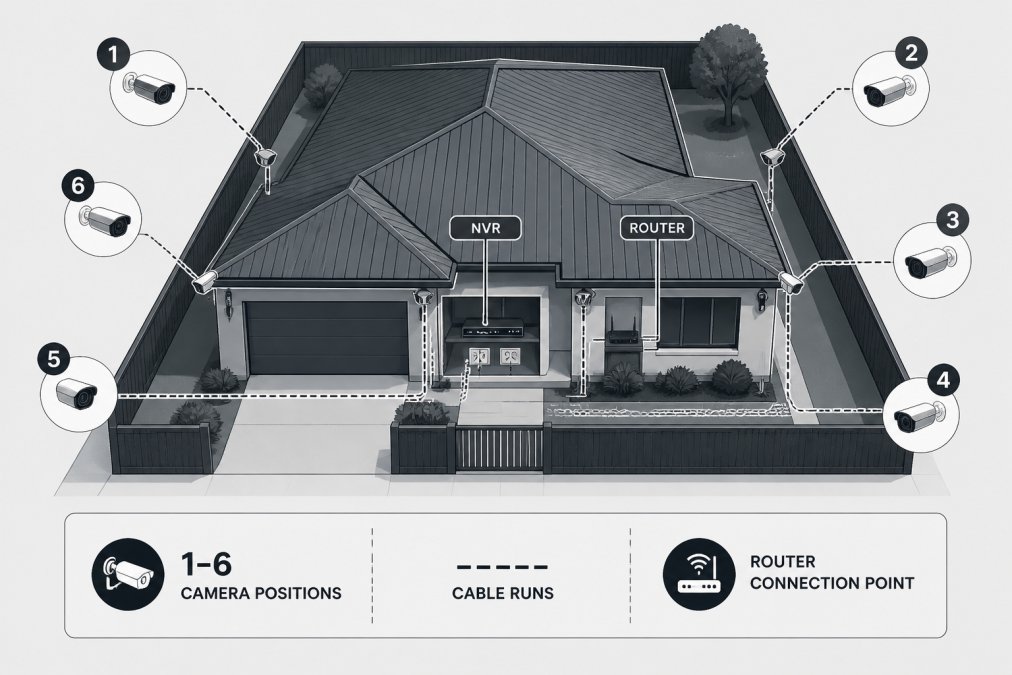
Security camera installation cost covers three things: the cameras themselves, the cabling or mounting hardware, and the licensed technician's time. A single-camera job is quick; a full perimeter protection layout with six or more cameras, video surveillance storage, and remote access takes considerably longer.
What most guides miss is that the recorder and storage drive are often quoted separately from the cameras. Ask whether the quote includes the NVR, the hard drive, and the mobile app control setup. Those three items routinely add to the final figure.
Home Alarm Monitoring Fees and Subscription Models Explained
Home alarm monitoring fees are the recurring part of your home security system cost, and they vary by subscription model. Back-to-base monitoring means your alarm signals a monitoring centre, which then dispatches a response. Self-monitored systems send push notifications to your phone instead, with no monthly service fee but no human response either.
Contract length matters here. Some providers lock you into multi-year agreements; others bill month to month. Read the exit terms before signing, because a cheap monthly fee over a long contract can cost more than a higher fee you can cancel.
- Back-to-base monitoring: professional oversight, monthly service fee, contract usually applies
- Self-monitoring: no monthly fee, relies on you noticing the alert
- Hybrid: app control plus optional monitoring, flexible but priced accordingly
DIY vs Professional Security Systems: The Real Cost Difference
DIY vs professional security systems is not simply cheap versus expensive. The gap is really about where the cost sits: a DIY kit moves labour, configuration and troubleshooting onto you, while a professional install moves them onto a licensed technician and prices them into the quote.
A useful way to compare the two is to price your own time. If a DIY kit takes a weekend to mount, pair and test, and you value that weekend at even a modest hourly rate, the apparent saving shrinks quickly. Add a return trip to the hardware store for the right cable, and the gap narrows further.
What professional installation actually buys you
- Compliance and documentation. A licensed installer can provide a certificate of compliance and a wiring diagram, which matters if you later sell the property or make an insurance claim.
- False alarm reduction. Correct sensor placement, pet-immune settings and zone programming are the difference between a system that works and one that annoys the neighbours.
- Warranty clarity. When one party supplies and installs, there is no finger-pointing between the kit manufacturer and the person who wired it.
- Insurance evidence. Many insurers ask for proof of professional installation before applying a premium discount, so the install cost can be partly offset over time.
Where DIY genuinely wins
Rentals, small units and short-term stays are the natural DIY territory. A wireless kit with adhesive mounts and app control can be removed and taken to the next address, and there is no drilling to negotiate with a landlord. The trade-off is that you carry the configuration burden and any false-alarm troubleshooting yourself.
The hybrid route
A middle path is increasingly common: buy the hardware yourself and pay a licensed technician for installation and commissioning only. This keeps hardware costs transparent while still producing the compliance paperwork and correct sensor placement. Ask any installer whether they offer a labour-only option before assuming the choice is binary.
Australian Competition and Consumer Commission guidance on consumer guarantees
Total Cost of Ownership: What the First Quote Does Not Show
Total cost of ownership over three to five years is the number that actually matters, and it is the one most quotes never show. Upfront cost is only the entry fee. Add annual monitoring, maintenance costs, battery replacements, and any system scalability upgrades, and the ranking of options often flips.
A cheaper DIY kit with no monitoring can end up costing more once you factor in replacements and your own time.
Privacy, Data Storage and Smart Home Integration Costs
Privacy and data storage are the hidden line items in a modern home security system cost, and almost no pricing guide on the market treats them as a cost category in their own right. They deserve their own budget line because the choice you make here changes both your recurring spend and your legal exposure.
Where your footage actually lives
- Cloud storage. Footage uploads to a provider's servers. You pay an ongoing subscription, often tiered by how many days of footage you retain and how many cameras you run. The upside is off-site redundancy; the downside is that the footage leaves your premises and the subscription never ends.
- Local storage (NVR or DVR). Footage records to a hard drive on your property. You pay once for the drive, but you own the backup responsibility. A drive failure without a backup means the footage is gone.
- Hybrid. Recent clips go to the cloud for quick access while bulk footage stays local. This is often the most expensive upfront but the most flexible, and it is the model most commonly recommended for households that want both remote access and data control.
The privacy dimension
Smart home integration: the compatibility tax
- Check the protocol first. Matter and Thread are the current cross-vendor standards, but older Zigbee and Z-Wave devices may not interoperate without a hub. Confirm before purchase, not after.
- Smart locks and lighting add cost. Integrating a smart lock or automated lighting into an alarm scenario typically requires either a compatible lock or a separate controller, and each adds to the upfront figure.
- Retrofitting is the expensive path. Buying a closed-ecosystem system first and trying to integrate later usually means replacing the panel or adding a bridge, which is why compatibility should be a purchase criterion, not an afterthought.
A practical way to budget
Conclusion: Getting an Accurate Quote for Your Property
An accurate figure only comes from a site inspection, not a phone estimate. Property requirements, camera count, monitoring preference, and integration needs all move the number, and no generic range survives contact with a real building.
Frequently Asked Questions
How much should I pay for a home security system?
There is no single figure because price depends on property size, whether you choose hardwired or wireless components, the number of cameras and sensors, and whether you want professional monitoring. A basic DIY kit costs far less upfront than a professionally installed system with back-to-base monitoring, but ongoing subscription fees change the long-term picture. Request itemised quotes so you can compare hardware, installation and monitoring separately rather than judging a single bundled number.
Are home security systems worth the cost?
Whether a system pays off depends on your risk profile and what you are protecting. A monitored alarm with motion sensors, security cameras and back-to-base response gives you verified evidence and a faster reaction when something happens. Many insurers offer an insurance premium reduction when a compliant, monitored system is installed, which offsets part of the ongoing cost. For properties in areas with higher break-in rates, the combination of deterrence and documented response usually justifies the spend.
Do I need professional installation for my security system?
Not always, but professional installation matters more than most people expect. Hardwired systems, alarm control panels, battery backup and Wi-Fi connectivity all need correct placement to avoid false alarms and coverage gaps. A licensed installer also completes a site inspection and security assessment, which is difficult to replicate with a DIY kit. If you already have partial infrastructure, a professional can integrate new cameras and sensors with what is there instead of starting from scratch.
What are the ongoing costs of monitored security systems?
Ongoing costs typically include a monthly service fee for back-to-base monitoring, data storage for video surveillance, maintenance costs and any subscription model charges for mobile app control or remote access. Contract length varies between providers, so check whether you are signing a 12-month or 24-month agreement. Ask what happens if you upgrade or add smart locks and home automation later, because system scalability often carries additional fees that are not in the original quote.