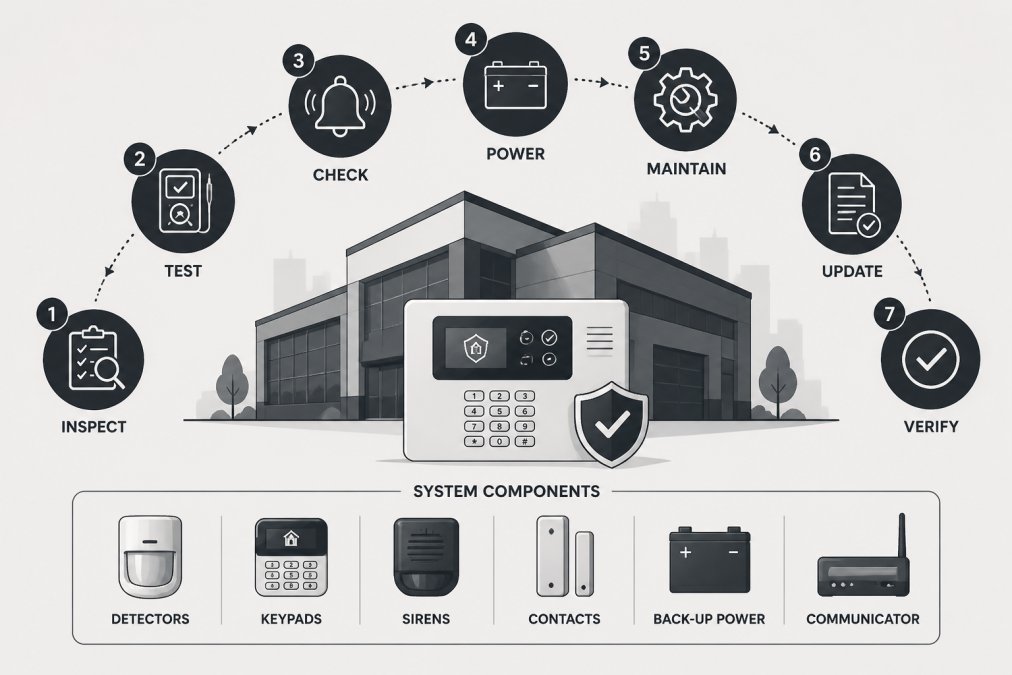
 how-to
Commercial Alarm System Maintenance: Step-by-Step Guide
Table of Contents
- Why Regular Commercial Alarm System Maintenance Matters
- What You'll Need Before Starting
- Step 1: Conduct a Visual Inspection of Hardware
- Step 2: Test Your Control Panel and Diagnostic Functions
- Alarm System Battery Replacement Frequency and Checks
- Step 3: Calibrate Sensors and Test Signal Transmission
- Step 4: Verify Siren, Strobe, and Monitoring Station Connectivity
- Creating a Commercial Alarm System Maintenance Checklist
- Frequently Asked Questions
Last Updated: September 20, 2026
Why Regular Commercial Alarm System Maintenance Matters
A commercial alarm system that hasn't been properly maintained is like a fire extinguisher that's never been checked. It might look fine on the wall, but when you actually need it, it could fail you. Regular maintenance keeps your system working when it counts most.
Businesses that skip maintenance face real consequences. False alarms waste response time and damage your relationship with monitoring stations. Faulty sensors miss actual threats. Batteries corrode and lose power. Control panels drift out of calibration. Each problem chips away at your security infrastructure until the system becomes unreliable.
Commercial alarm system maintenance isn't complicated, but it does require discipline. You need to test components regularly, keep detailed logs, and know when to call a professional. This guide walks you through exactly what to do, step by step.
What You'll Need Before Starting
Before you begin any maintenance work on your commercial alarm system, gather the right tools and information. You'll need access to your system documentation and the ability to test basic functions.
Essential items to have ready:
- Your system manual and control panel documentation
- A maintenance log or checklist (we'll provide one below)
- A torch or headlamp for visual inspections
- A multimeter to test battery voltage (optional but helpful)
- Contact details for your monitoring station
- A camera or phone to photograph any issues you find
Access requirements:
You'll need the master code to access your control panel's diagnostic functions. If you don't have this, contact your installer or monitoring service. You'll also need physical access to all sensors, the main control panel, the battery backup, and the siren or strobe unit.
Safety note: Don't attempt to repair wiring or replace components unless you're trained to do so. Improper work can damage the system or create safety hazards. When in doubt, call a professional technician.
Step 1: Conduct a Visual Inspection of Hardware
Start with what you can see. A visual inspection catches obvious problems before they become failures. Walk through your premises and check every component of your alarm system.
Check the control panel:
Look for signs of damage, corrosion, or loose connections. The panel should be mounted securely and free from moisture. If you see water stains, discolouration, or burnt marks, stop and contact a technician immediately. These indicate electrical damage that could cause the entire system to fail.
Inspect all sensors:
Visit every door, window, and motion detector. Check that sensors are firmly mounted and aligned correctly. Glass break sensors should point toward the glass they're meant to protect. Motion detectors should have a clear line of sight across the area they monitor. Dust or cobwebs on sensor lenses reduce their effectiveness, so wipe them clean with a soft, dry cloth.
Examine the battery backup:
Locate your backup battery (usually near the control panel). Look for corrosion around the terminals or leaking fluid. Corroded batteries lose capacity and may fail when needed most. If you see white, blue, or green powder around the terminals, that's corrosion. Clean it gently with a dry cloth or ask a technician to replace the battery.
Check the siren and strobe:
Verify that your siren and strobe unit are securely mounted and free from damage. Test that the lens on the strobe is clean and unobstructed. A covered strobe won't flash properly, which defeats its purpose as a visual alarm.
Step 2: Test Your Control Panel and Diagnostic Functions
Your control panel is the brain of your system. It monitors all sensors and triggers the alarm when needed. Most modern panels have built-in diagnostic functions that tell you the health of your system.
Access the diagnostic menu:
Enter your master code into the keypad. Navigate to the diagnostic or system test menu (the exact path depends on your panel model). Your manual will show you where this is located. The diagnostic function will run a self-check of all connected components and report any faults.
Review the fault log:
The panel displays a list of recent faults or errors. Common faults include:
- Low battery voltage
- Sensor communication loss
- Zone bypass (a sensor that's been disabled)
- AC power loss
- Monitoring station communication failure
Write down any faults you see. Some are minor (a sensor that's temporarily offline). Others are critical (no connection to the monitoring station). Address critical faults immediately.
Test keypad responsiveness:
Press several keys on the keypad and watch for immediate response. Sluggish or unresponsive keys suggest a failing keypad or loose connections. Test the panic button if your system has one. It should trigger an alarm when pressed.
Check the display:
The screen should show your system status clearly. If text is faded, flickering, or partially missing, the display may be failing. A failing display makes it impossible to see system status, so this needs professional attention.
Alarm System Battery Replacement Frequency and Checks
Your backup battery keeps the system running during a power cut. Without it, your alarm goes silent the moment the mains power fails. Battery maintenance is one of the most critical parts of commercial alarm system maintenance.
Battery replacement schedule:
Most commercial alarm batteries last between three and five years, depending on how often they're used and the ambient temperature. Check your battery's date code (usually printed on the label). If it's over three years old, plan to replace it soon. If it's over five years old, replace it immediately.
Monthly battery checks:
Use a multimeter to test the battery voltage. A healthy backup battery should read between 12 and 13.8 volts. If it reads below 12 volts, the battery is weak and needs replacement. If it reads below 10 volts, the system has already lost backup power protection.
Signs your battery is failing:
- The control panel shows a low battery warning
- The battery feels warm to the touch (overcharging)
- Corrosion around the terminals
- Visible cracks or leaks in the battery case
- The system fails to hold a test backup power condition
Any of these signs means the battery should be replaced within a week.
Professional battery service:
If you're uncomfortable testing or replacing the battery yourself, this is a job for a licensed technician.
Step 3: Calibrate Sensors and Test Signal Transmission
Sensors are your system's eyes and ears. If they're out of calibration or losing signal, they can't detect threats. Regular calibration and signal testing ensure they work when needed.
Test each sensor individually:
Check motion detectors:
Verify signal strength:
Test the monitoring station connection:
Document your findings:
Step 4: Verify Siren, Strobe, and Monitoring Station Connectivity
Your siren and strobe are the final link in your alarm chain. They alert people to the threat and summon help. Your monitoring station connection is what brings that help to your door.
Test the siren:
Test the strobe:
Verify monitoring station connectivity:
Check the communication path:
Document test results:
Creating a Commercial Alarm System Maintenance Checklist
Consistency is what makes maintenance work. A documented checklist ensures nothing gets missed and creates a record of your diligence. Here's what your maintenance checklist should include.
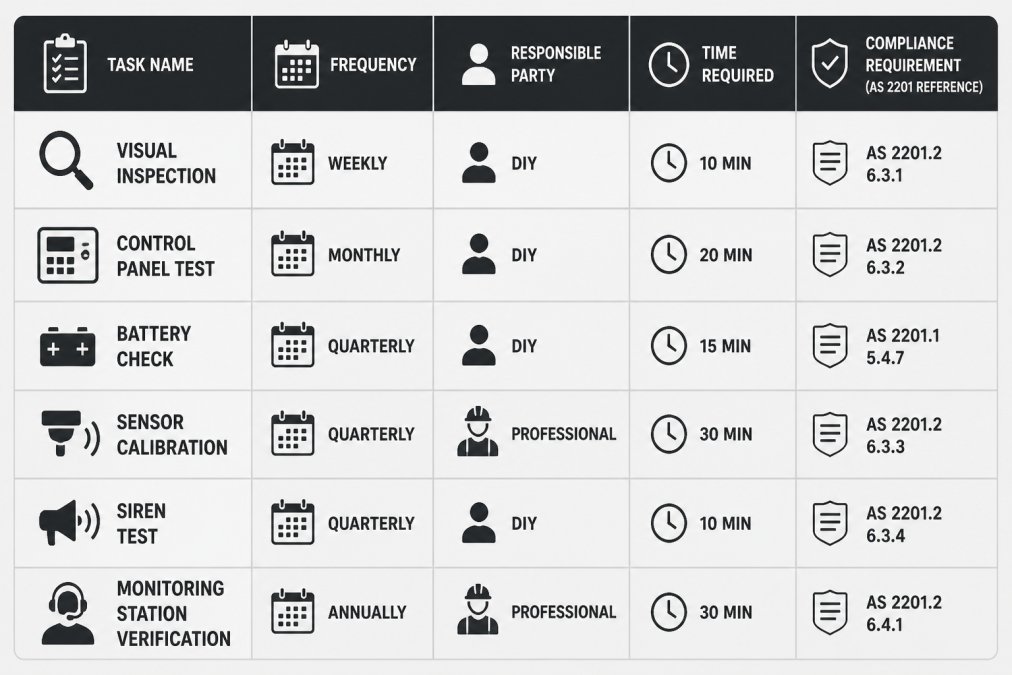
Your checklist should track:
- Visual inspection of all hardware
- Control panel diagnostic test results
- Battery voltage and condition
- Sensor activation tests
- Signal transmission verification
- Siren and strobe functionality
- Monitoring station connectivity
- Any faults found and actions taken
- Date and person responsible for each check
Maintenance frequency guide:
Weekly tasks:
- Check the control panel for any fault indicators
- Visually inspect the main panel and battery area for obvious damage
Monthly tasks:
- Test battery voltage with a multimeter
- Activate a test alarm and verify siren and strobe function
- Check one or two sensors for proper operation
Quarterly tasks:
- Run a full diagnostic test on the control panel
- Test all sensors and motion detectors
- Verify monitoring station connectivity with your provider
Annual tasks:
- Professional technician inspection of the entire system
- Full system backup and documentation update
- Review and update your maintenance log
- Verify compliance with AS 2201 security system standards
Keep detailed records:
When to call a professional:
- Corrosion that won't clean off
- Broken wiring or loose connections
- Sensors that won't calibrate
- Battery that won't hold voltage
- Any fault you can't diagnose
- System failures during testing
Frequently Asked Questions
How often should commercial security systems be professionally serviced?
Most commercial alarm systems require professional servicing at least annually to maintain AS 2201 compliance and system integrity. High-risk facilities or those with complex monitoring requirements may need quarterly visits. Your maintenance log should document every service visit. Between professional calls, conduct monthly visual inspections and test your control panel diagnostics to catch issues early. A professional technician can identify fault detection problems and verify signal transmission that DIY checks may miss.
What should be included in a commercial alarm system maintenance checklist?
A comprehensive commercial alarm system maintenance checklist must cover: visual inspection of all hardware for corrosion or damage, control panel diagnostic testing, sensor calibration checks, battery condition and replacement assessment, siren and strobe activation testing, keypad responsiveness verification, and monitoring station connectivity confirmation. Include dates, technician name, and any issues found. This documentation protects your compliance status and creates an audit trail for insurance purposes. Monthly checklists should focus on quick visual and functional checks; annual checklists should be more thorough and performed by a licensed technician.
What are common causes of commercial alarm system false alarms?
False alarms often result from poorly calibrated motion detectors or glass break sensors, dead or low batteries causing intermittent faults, dust or environmental debris affecting sensor lenses, tamper switch sensitivity set too high, or signal transmission interference from nearby electrical equipment. Hardwired systems may experience false alarms due to loose connections or power supply fluctuations. Environmental impact, such as temperature extremes or humidity affecting battery corrosion, also triggers nuisance alerts. Regular sensor calibration, battery replacement on schedule, and visual inspection of sensor positioning can eliminate most false alarm causes. If false alarms persist, a technician should perform diagnostic testing to identify fault codes.
What is AS 2201 and how does it affect my maintenance requirements?
AS 2201 is the Australian Standard for security systems and specifies minimum design, installation, and maintenance standards for commercial alarm systems. It mandates that systems be regularly tested, inspected, and maintained to ensure system downtime is minimised and emergency protocols remain effective. AS 2201 requires documented maintenance records, annual certification by a licensed technician, and compliance with preventative maintenance schedules. Your maintenance log must prove that fault detection, signal transmission, and battery backup systems are functioning. Failure to maintain AS 2201 compliance can void insurance claims and expose your business to liability. Professional servicing ensures your system meets these regulatory standards.