 how-to
CCTV System Audit for Warehouses: Step-by-Step Guide
Table of Contents
- What You'll Need Before Starting Your CCTV System Audit
- Step 1: Map Your Current CCTV System Audit Coverage
- Step 2: Assess CCTV Privacy Laws in the Workplace Australia
- Step 3: Complete Your Warehouse Security Camera Compliance Checklist
- Step 4: Develop Your Warehouse Surveillance System Maintenance Schedule
- Step 5: Identify Coverage Gaps and Behaviour Detection Capabilities
- Common Mistakes to Avoid During Your CCTV System Audit
- Post-Audit Remediation and Next Steps
- Frequently Asked Questions
Last Updated: September 2, 2026
What You'll Need Before Starting Your CCTV System Audit
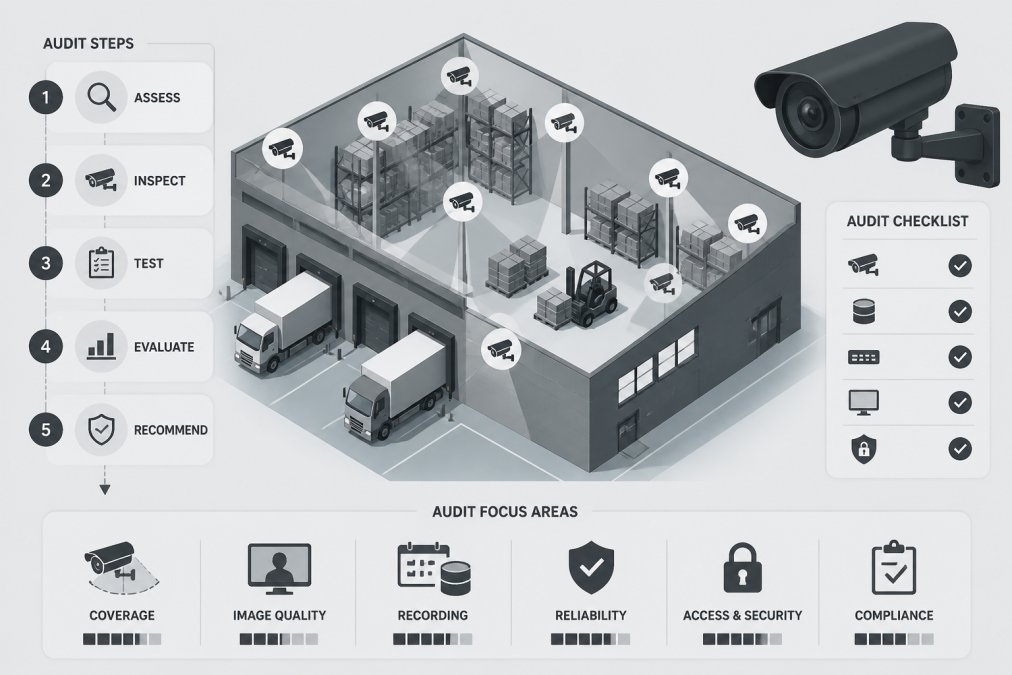
A CCTV system audit for warehouses is a systematic evaluation of your surveillance infrastructure to verify coverage, compliance, and operational effectiveness. Gather documentation on your current setup: network diagrams, camera specifications, NVR configurations, access logs, and incident reports. You'll also need a site map marked with current camera locations.
A proper audit verifies that your entire surveillance ecosystem addresses risk, meets legal obligations, integrates with access control, and performs as intended under real operating conditions. Tupper Security recommends conducting this audit at least annually, or immediately after any security incident, staffing change, or modification to your warehouse operations.
Step 1: Map Your Current CCTV System Audit Coverage
Walk the warehouse with a camera inventory sheet listing each device: model, resolution, frame rate, installation date, field of view, and current condition. Note whether each camera is hardwired or wireless, PoE-powered or traditional cabling, and which NVR it connects to.
Create a visual map showing camera placement against your warehouse layout. Mark blind spots where no camera has sight lines, corners behind tall shelving, spaces under loading dock overhangs, and areas obscured by inventory stacks.
Key areas for camera coverage in warehouses
Dock doors and loading areas demand continuous surveillance because this is where inventory enters and exits. Position cameras to capture faces and vehicle registration plates. High-value storage zones require dedicated cameras with clear sight lines to shelving units. Perimeter security benefits from cameras covering all external entry points and fence lines. Access control integration points (doors, gates, turnstiles) should have cameras positioned to verify that the person using credentials matches the authorized user.
Evaluating camera resolution and frame rate
Resolution determines whether your footage can identify individuals or simply show that activity occurred. For dock monitoring and high-value storage, 4MP (2688 × 1520) is the minimum standard (peer-reviewed research). This resolution captures enough detail to identify faces at typical warehouse distances and read vehicle registration plates from 10 metres away. For perimeter security covering larger areas, 2MP may suffice if cameras are positioned closer to points of interest.
Frame rate affects how smoothly motion appears in playback and how much storage your NVR requires. A 30 fps (frames per second) recording captures fluid motion and is ideal for behaviour detection and incident investigation. Many warehouses operate at 15 fps to reduce storage demands, which is acceptable for general surveillance but reduces clarity during fast-moving incidents.
Test your current setup by reviewing recorded footage from your NVR. Can you identify a staff member's face from typical warehouse distances? Can you read a delivery docket held in someone's hand? If the answer is no, your resolution or frame rate needs adjustment.
Step 2: Assess CCTV Privacy Laws in the Workplace Australia
Surveillance in the workplace is heavily regulated. The Privacy Act 1988 (Cth) governs how organisations collect, use, and disclose personal information, including video recordings (legislation.gov.au). The Australian Privacy Principles (APPs) require that surveillance be reasonable, necessary, and proportionate to legitimate business purposes. Covert surveillance or recording without consent in areas where employees have a reasonable expectation of privacy is generally unlawful.
Your CCTV system audit must verify that your surveillance complies with these obligations.
Employee notification and consent requirements
Post clear, visible notices at all warehouse entrances and in areas under surveillance. The notice must state that CCTV is in operation, explain the purpose (security, loss prevention, incident investigation), and identify the organisation responsible. Your surveillance policy should specify which areas are monitored, how long footage is retained, who has access to recordings, and what happens to footage after retention periods expire. Areas where employees have a reasonable expectation of privacy (toilets, change rooms, medical facilities) cannot be surveilled under any circumstances.
Data privacy and network security considerations
Surveillance footage is personal information under the Privacy Act. Your NVR must not be accessible from the public internet without authentication. Implement role-based access controls: only authorized personnel (security managers, incident investigators, HR staff) should access footage. Log all access attempts. Data breach notification is mandatory under the Privacy Act. If your CCTV system is compromised and personal information is accessed without authorization, you must notify affected individuals and the Office of the Australian Information Commissioner.
Step 3: Complete Your Warehouse Security Camera Compliance Checklist
WHS (Work Health and Safety) regulations in your state or territory may impose specific requirements for CCTV systems. Your audit checklist should verify that your system captures incidents from angles that allow investigation.
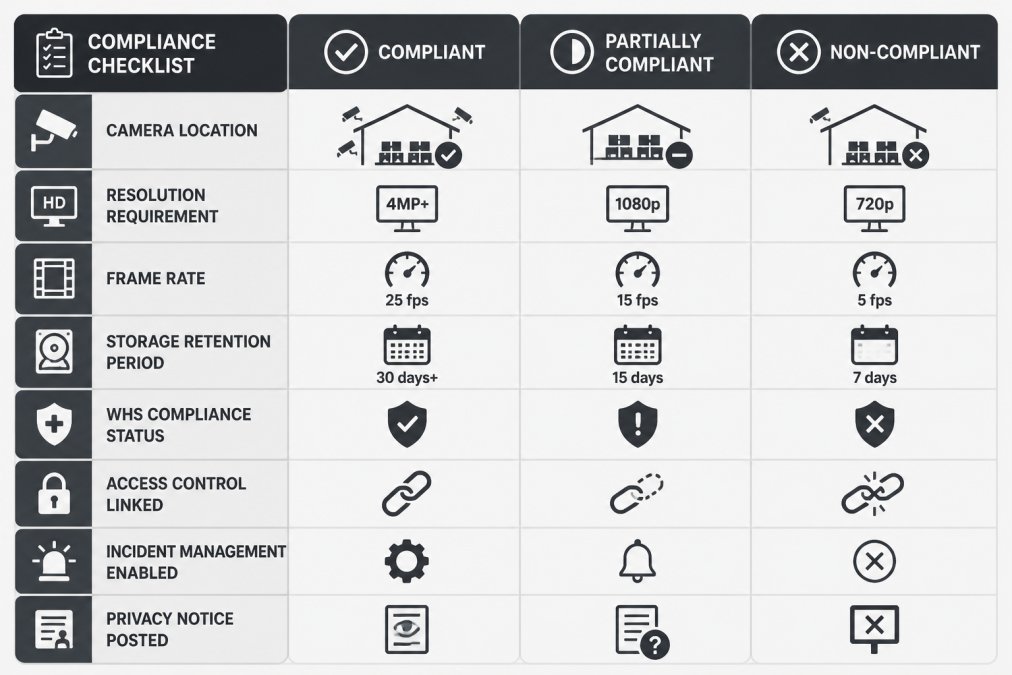
WHS compliance and incident management documentation
Create a matrix documenting each camera location, its purpose, the resolution and frame rate it operates at, how long footage is retained, and whether it's linked to your access control system. Most warehouses retain footage for 30 days minimum; some require 90 days if they're involved in frequent disputes with customers or suppliers. Configure your NVR to flag and preserve footage automatically when an incident occurs. Document the chain of custody for incident footage: who retrieves it, who has access, how it's stored, and for how long.
Access control system integration and audit trails
Your CCTV system audit must verify that access control and surveillance are linked. When a door is opened, does your system record video? When credentials are used, is the access event logged alongside video of who used them? Test the integration by triggering access events and verifying that corresponding video is captured and timestamped. Configure your system to preserve audit trails automatically: logs of who accessed footage, when, and why.
Step 4: Develop Your Warehouse Surveillance System Maintenance Schedule
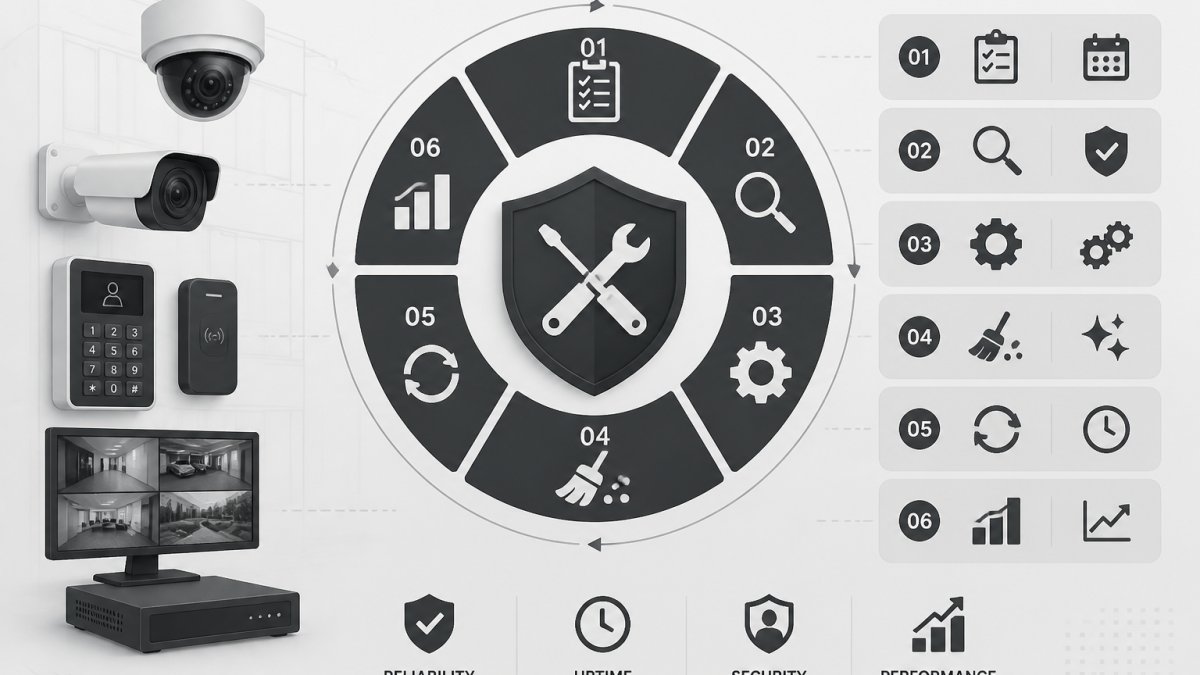
A CCTV system audit is only valuable if the system remains in good working order after the audit. Develop a maintenance schedule covering firmware updates, hardware inspection, storage monitoring, and system health checks.
Weekly maintenance should include checking that all cameras are transmitting video and that the NVR is recording. Review storage use on your NVR; if it's approaching capacity, adjust retention settings or upgrade storage before the system stops recording.
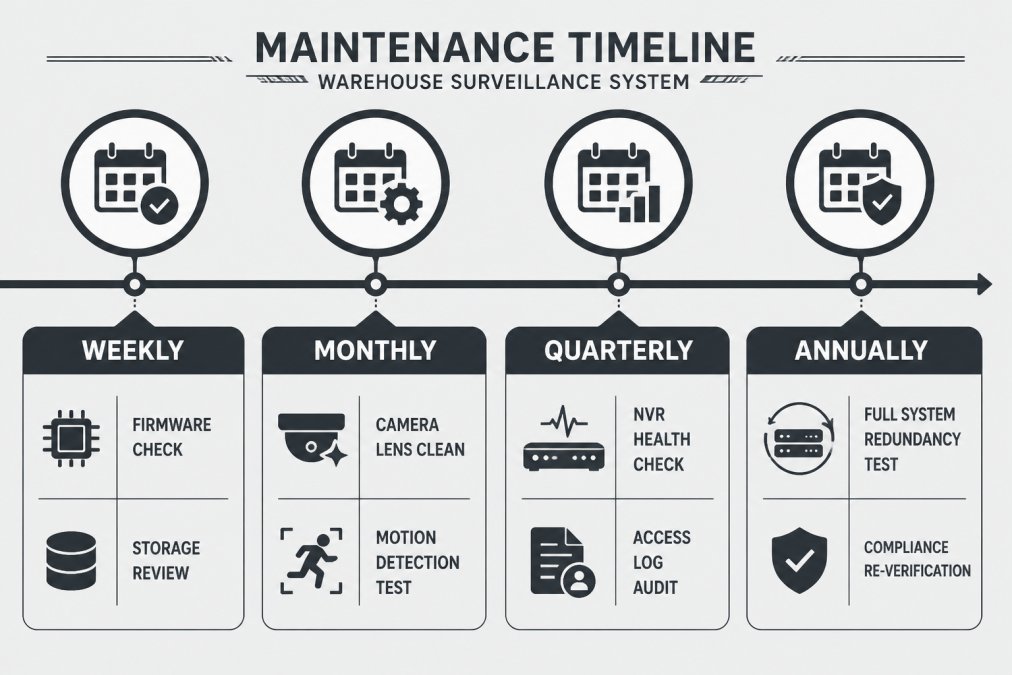
Firmware updates and system health checks
Firmware updates patch security vulnerabilities and add features. Check your NVR and camera manufacturers' websites monthly for available updates. Test updates in a non-critical environment first, then schedule updates during off-peak hours. System health checks should verify that your NVR's CPU usage, memory, and disk I/O are within normal ranges. Test your backup and redundancy systems quarterly.
Storage retention and NVR performance monitoring
Calculate your actual storage needs based on resolution, frame rate, and number of cameras. A single 4MP camera recording at 30 fps consumes approximately 1.5 TB per month (peer-reviewed research). If you have eight cameras, you're looking at 12 TB per month. A warehouse requiring 90-day retention needs at least 36 TB of storage.
Monitor your NVR's storage use weekly. Most systems allow you to set automatic alerts when storage reaches 80% capacity. If your NVR is dropping frames, it's not recording everything that happens. If you see dropped frame warnings frequently, you may need to reduce frame rate, lower resolution, or distribute cameras across multiple NVRs.
Step 5: Identify Coverage Gaps and Behaviour Detection Capabilities
After mapping your system and verifying compliance, focus on what your current setup doesn't do. Most warehouses have basic motion detection but lack behaviour detection, the ability to identify specific actions like someone lingering in a high-value storage area or removing items from shelves.
Behaviour detection uses video analytics to flag suspicious activity automatically. This capability is particularly valuable for shrinkage reduction because it catches theft in progress.
High-value storage and inventory shrinkage monitoring
Inventory shrinkage typically results from theft, damage, or administrative error. CCTV creates accountability. Position cameras to capture clear views of high-value storage areas from multiple angles. Configure motion detection to trigger alerts whenever movement occurs in these zones during non-operating hours. Configure behaviour detection to flag loitering or unusual activity. Link these alerts to your access control system so unauthorized access automatically generates an incident report.
AI-driven false alarm reduction and motion detection
Basic motion detection generates many false alarms: shadows, dust particles, or reflections can trigger alerts. AI-driven detection reduces this problem by learning to distinguish between genuine threats and environmental noise. Modern systems use machine learning to identify human movement specifically, ignoring shadows and reflections. Configure alerts for behaviours that matter to your business and adjust sensitivity settings until you achieve the balance between catching genuine incidents and avoiding false alarms.
Common Mistakes to Avoid During Your CCTV System Audit
The most common mistake is treating the audit as a checkbox exercise rather than a genuine assessment of your security posture. Don't assume that your system is working because you can see live video on the monitor. Verify that cameras are recording at the resolution and frame rate you think they are, that storage is sufficient, and that footage is being retained according to your policy.
Avoid overlooking network security. Many warehouses focus on physical camera placement and forget that their NVR is accessible over the network. If your NVR uses a default password, has unpatched firmware, or is accessible from the internet without authentication, your footage is vulnerable. Don't skip the privacy compliance step. Underestimating storage needs is another frequent error. Build in a safety margin; if you calculate you need 30 TB, purchase 40 TB.
Post-Audit Remediation and Next Steps
After completing your audit, prioritize findings into three categories: critical (address immediately), important (address within 30 days), and nice-to-have (address within 90 days).
Critical issues include: non-compliance with privacy laws, security vulnerabilities in your network, cameras not recording, storage failures, and coverage gaps in high-risk areas. Important issues include: cameras operating below specification, outdated firmware, retention settings that don't align with your policy, and behaviour detection that needs configuration.
Create a remediation plan with specific actions, responsible parties, and completion dates. Tupper Security recommends conducting a full CCTV system audit for warehouses every 12 months, with spot checks quarterly. After any significant incident, security breach, or operational change, conduct a targeted audit of affected areas. Document your audit process and findings thoroughly. This documentation demonstrates due diligence if you ever need to defend your security practices to regulators, in court, or to insurance providers.
Your audit is only valuable if it leads to action. Implement findings, verify implementation, and measure the impact.
A documented CCTV system audit for warehouses creates accountability and reduces risk, but only if findings are acted upon. Tupper Security's site risk assessments and security design reviews help warehouse operators transform audit findings into practical improvements. Our multi-class licensed operators understand warehouse operations and can recommend surveillance configurations that actually prevent shrinkage and support incident investigation. Request a quote to discuss how a tailored security assessment can address your specific coverage gaps and compliance requirements.
Frequently Asked Questions
How often should a warehouse CCTV system audit be conducted?
Conduct a full CCTV system audit annually, with quarterly spot-checks of critical areas like dock doors, high-value storage, and access control integration points. After any incident or security breach, perform an immediate audit to identify gaps. If you've made system changes (new cameras, NVR upgrade, access control link), audit within 30 days. Regular audits catch degraded camera resolution, storage retention failures, and compliance drift before they become liabilities.
What are the rules regarding CCTV cameras in the workplace under Australian law?
Under Australian privacy law, employers must notify employees that CCTV is in use and explain why. Surveillance of break rooms, toilets, and change rooms is prohibited. Footage retention cannot exceed what's necessary for the stated purpose, typically 30-90 days for general security. Access to footage must be restricted to authorised personnel. Employers must balance security needs against privacy rights; excessive monitoring can expose you to legal liability. WHS legislation requires incident documentation, so your CCTV audit must verify that footage supports incident management workflows and audit trails.
What should be included in a warehouse CCTV system audit checklist?
Your checklist must cover: camera placement and field-of-view adequacy for dock doors, aisles, and high-value storage; resolution and frame rate suitability for incident identification; NVR storage capacity and retention schedule compliance; firmware currency and system redundancy; access control integration and audit trail logging; motion detection and behaviour detection tuning; privacy notice placement; employee consent documentation; and WHS incident management workflows. Include network security (PoE system integrity, encryption status) and cybersecurity of surveillance networks to prevent unauthorised access.
How does CCTV system audit help reduce inventory shrinkage in warehouses?
A thorough CCTV system audit identifies blind spots where theft or loss occurs undetected. By verifying camera coverage of high-value storage areas, dock doors, and dispatch zones, you close gaps that enable shrinkage. Behaviour detection capabilities flag unusual activity patterns (unauthorised access, unusual dwell time in restricted areas). Real-time alerts enable faster incident response. Audit trails linking CCTV footage to access control logs prove who accessed what, when. This combination, documented coverage, behaviour monitoring, and audit trails, creates accountability and deters loss. Post-audit remediation to fill coverage gaps directly reduces shrinkage.
This article was written using GrandRanker