 ultimate-guide
CCTV Installation Costs for Gold Coast Businesses: 2026 Guide
Table of Contents
- What Drives CCTV Installation Costs for Gold Coast Businesses
- Commercial Security Camera System Pricing: Hardware and Recording Options
- CCTV Installation Legal Requirements Queensland
- CCTV Maintenance and Service Costs to Budget For
- Integrating CCTV With Existing Security Infrastructure
- Scalability and Ongoing Operational Costs
- Frequently Asked Questions
Last Updated: September 11, 2026
What Drives CCTV Installation Costs for Gold Coast Businesses
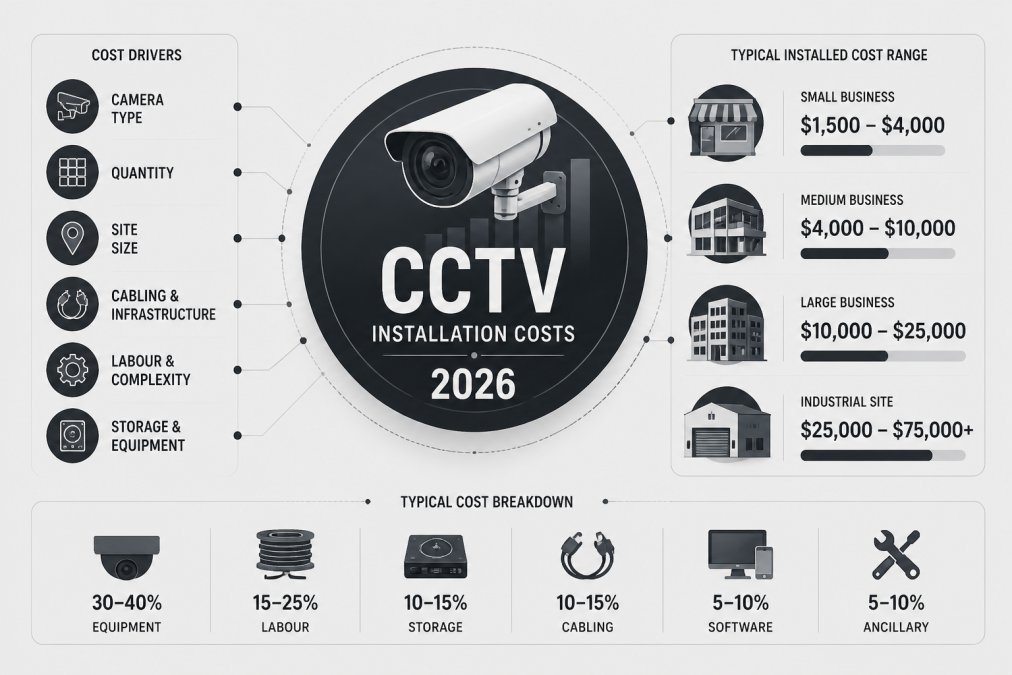
CCTV installation costs for Gold Coast businesses are shaped by three things above all else: how many cameras you need, how they connect back to your recorder, and how much labour the site itself demands. This guide breaks down each cost driver so you can budget with real numbers instead of guesswork.
The biggest mistake businesses make is shopping on camera price alone. Hardware is rarely the largest line item. Cabling, access equipment and after-hours labour usually decide whether a quote lands at the low or high end.
Camera Count and Resolution
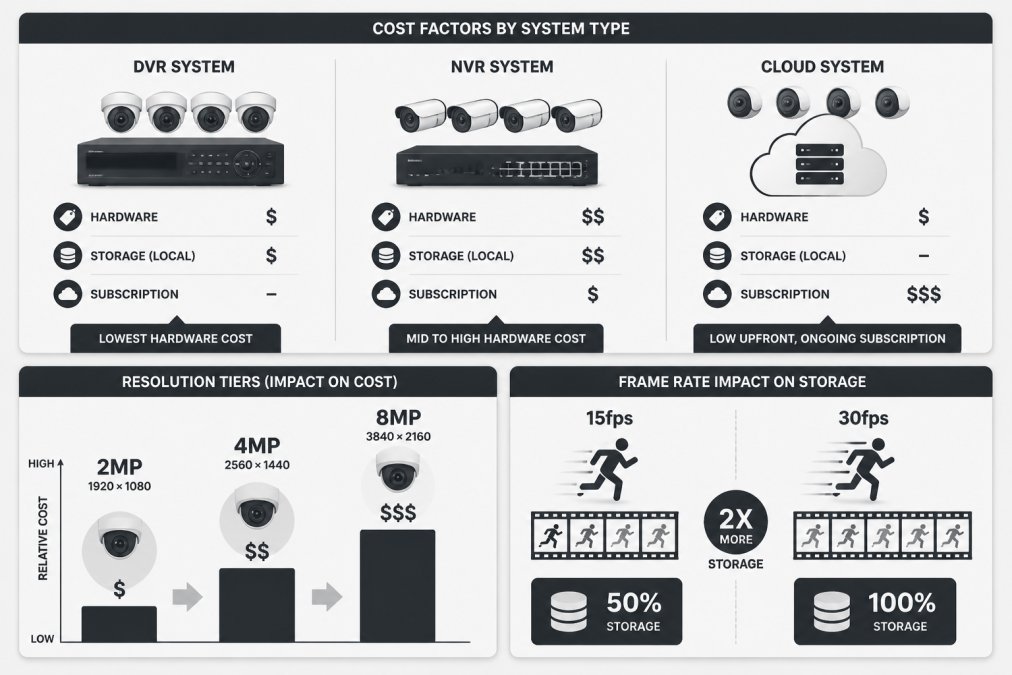
Resolution drives cost faster than any other single specification. A 2MP camera covers a doorway adequately; an 8MP unit captures number plates and facial detail across a car park. Each step up adds storage load, bandwidth demand and unit price.
Count cameras by coverage, not by floor area. A retail floor might need four cameras for till points, entry, stockroom and rear lane. A warehouse often needs fewer indoors but more along the perimeter.
Cabling, Labour and Site Access
Cabling is where budgets quietly blow out. Hardwired runs through finished ceilings, double-brick walls or underground trenches take time, and time is the cost. Wireless links reduce cabling but need clean line of sight and reliable power at each point.
Site access matters just as much. Working at height, confined roof spaces and heritage facades all slow an install. So does after-hours scheduling, which retail and hospitality sites usually need to avoid disrupting trade.
Commercial Security Camera System Pricing: Hardware and Recording Options
Commercial security camera system pricing splits into four buckets: cameras, recording hardware, cabling and labour. Recording is the bucket most buyers underestimate, and labour is the one that varies most between quotes for the same job.
As a rough planning guide, most small commercial sites (four to eight cameras) land somewhere in the low-to-mid four-figure range for a professionally installed IP system, while larger multi-building sites with 16-plus cameras, analytics and integration routinely run into the mid five figures. Treat those as bands, not quotes, the only number that matters is the one produced after a site inspection.
IP cameras stream footage to a network video recorder (NVR), which handles high-definition streams and video analytics well. Older analogue setups feed a DVR. NVR systems cost more upfront but scale further and integrate with access control and remote monitoring more cleanly.
| System Type | Recording Method | Best For | Relative Hardware Cost |
|---|---|---|---|
| DVR (analogue) | Local DVR unit | Small sites upgrading legacy coax | Lowest |
| NVR (IP) | Local NVR, PoE cameras | Most commercial sites | Mid to high |
| Cloud storage | Offsite subscription | Multi-site, low on-site space | Low upfront, ongoing fee |
What Actually Moves the Quote
Three variables separate a low quote from a high one on the same site:
- Resolution and low-light performance. A 2MP camera is fine for a doorway. An 8MP unit with true colour night vision is what you need to identify a face across a car park. Each step up multiplies storage and bandwidth, not just unit price.
- Cabling route. A camera 40 metres from the recorder through a finished ceiling is a different job to one 8 metres away through an accessible service void. Cable type (Cat6 vs coax vs fibre) and containment (conduit, tray, trenching) drive labour hours more than camera count.
- After-hours access. Retail, hospitality and medical sites often need installs outside trading hours. Penalty rates for evening and weekend work can add a meaningful premium to the labour line, and it is rarely itemised unless you ask.
NVR vs DVR vs Cloud: The Real Trade-off
DVR keeps cost down but locks you into analogue resolution and limits analytics. NVR is the default for new commercial work because it scales, supports PoE (so cameras draw power over the same cable as data), and integrates with access control and alarm platforms.
Cloud storage shifts spend from capital to operating budget. That suits businesses that would rather pay monthly than fund a large upfront purchase, but it adds a recurring line you must budget for permanently, and it depends on upload bandwidth being adequate at every camera. A common pattern is hybrid: local NVR for continuous recording, selective cloud backup for high-value events.
Total Cost of Ownership, Not Sticker Price
The cheapest quote usually optimises hardware and ignores operational cost. Over a five-year horizon, the number worth comparing includes the upfront install, storage subscriptions, maintenance visits, software or analytics licences, and the cost of any camera moves triggered by shopfits or lease changes. A system that is cheaper today but needs a recorder replacement in year three is not cheaper.
CCTV Installation Legal Requirements Queensland
CCTV installation legal requirements Queensland businesses must meet centre on privacy law, signage and footage handling. The Information Privacy Act 2009 (Qld) governs how personal information, including recorded images, is collected and stored (oaic.gov.au). The Office of the Australian Information Commissioner publishes guidance on surveillance and privacy obligations for organisations that applies to most businesses, and the Queensland Office of the Information Commissioner handles state-level complaints and enquiries.
Most guides stop at "put up a sign and don't point it at the neighbour." The practical obligations go further, and getting them wrong is where businesses actually come unstuck.
The Core Obligations in Practice
- Signage before entry. A person should know they are entering a monitored area before they are recorded. Signage at the entrance, not just inside, is the standard.
- Purpose limitation. Record only areas you genuinely need to monitor for a lawful business purpose. Cameras should not overlook neighbouring property, change rooms, toilets, or staff break areas.
- Secure storage and access control. Footage must be stored securely, with access limited to authorised staff and a log of who viewed what.
- Retention and deletion. Set a documented retention period, commonly 30 to 90 days for most commercial sites, and delete on schedule. Keeping footage indefinitely increases both privacy risk and breach exposure.
- Written policy. Have a policy covering how footage is collected, stored, accessed, disclosed and destroyed, and how requests for footage are handled.
Audio, Covert Cameras and Workplace Surveillance
Audio recording carries stricter consent rules than video. In Queensland, recording a private conversation without consent can breach both privacy law and the Criminal Code, even when the video itself is compliant (legislation.qld.gov.au). If you cannot justify the microphone, leave it disabled.
Covert cameras, hidden from staff or customers, sit in a different legal category again. Workplace surveillance of employees is regulated, and covert monitoring generally requires a clearly documented lawful purpose, a defined scope and duration, and often prior notification to the workforce. A camera hidden in a stockroom to catch a suspected thief is not automatically lawful just because the business owns the room.
Footage, Remote Access and Data Location
Where your footage is stored matters. Cloud platforms may store data offshore, and cross-border disclosure of personal information carries additional obligations under the Information Privacy Act. If you use a cloud NVR or remote viewing app, check where the data sits, who can access it, and what happens to it if you cancel the subscription.
Remote access also creates a cybersecurity obligation. Default passwords, unpatched firmware and exposed ports are the most common ways business camera systems get compromised. Treat the camera network as a separate segment from your point-of-sale and office systems, and change default credentials on day one.
When to Get Advice
If you operate multiple sites, monitor staff, or store footage offshore, a short review with a privacy adviser or your industry association is cheap insurance. A site risk assessment should map camera positions against these obligations before installation, not after.
CCTV Maintenance and Service Costs to Budget For
CCTV maintenance and service costs are the line item most businesses forget entirely. A system that is never serviced fails exactly when you need it, and insurers increasingly ask for maintenance records after a claim.
Budget for periodic checks covering lens cleaning, firmware updates, storage health and recording verification. A camera that appears online but has not recorded for three weeks is worse than no camera, because you believed you were covered.
Common maintenance tasks include:
- Cleaning lenses and housings, especially in coastal or dusty environments
- Testing motion detection zones and real-time alerts
- Checking hard drive health and footage retention against your policy
- Reviewing field of view after shopfits, signage or landscaping changes
- Confirming data encryption and remote access credentials are current
Coastal salt air and humidity accelerate hardware wear. Cameras near the water need more frequent attention than inland installs.
Integrating CCTV With Existing Security Infrastructure
Integration is where a good system earns its keep. Most businesses already run some combination of alarm, access control and CCTV. The question is whether those systems talk to each other.
A site risk assessment should map what you already own before anyone quotes a replacement. Often the cameras are serviceable and only the recorder or network layer needs upgrading. That single decision can cut a project's cost dramatically.
When systems integrate, a forced door can trigger a camera preset, log the event and push a real-time alert to your phone. Access control becomes auditable and revocable, so you know who entered and when, and you can remove a departed contractor's credentials the same day.
We build integration work around how a site actually operates rather than a generic schedule. Our multi-class licensed operators handle independent site risk assessments and security design reviews, which means the recommendation starts from your existing infrastructure, not a blank slate.
Scalability and Ongoing Operational Costs
Scalability planning separates a system that lasts a decade from one you replace in three years. Two questions decide it: can you add cameras without replacing the recorder, and can you add sites without adding chaos?
Ongoing operational costs fall into predictable categories:
- Monitoring and alarm response fees
- Cloud storage or offsite backup subscriptions
- Maintenance and servicing visits
- Bandwidth and network upgrades
- Licence fees for video analytics or access control software
If you operate across multiple sites, insist on one standard and one point of contact. Different teams applying different standards at each location creates gaps that are easy to exploit and hard to audit.
Frequently Asked Questions
How much does CCTV cost for a business?
The total cost depends on camera count, resolution, cabling runs, recording hardware and whether you choose NVR, DVR or cloud storage. A four-camera system for a small retail site costs far less than a multi-site warehouse deployment. You can get a figure tied to your actual layout rather than a generic estimate by requesting a quote.
Are there ongoing costs associated with business CCTV systems?
Yes. Beyond installation, budget for CCTV maintenance and service costs, which typically cover scheduled inspections, lens cleaning, firmware updates and hard drive checks. Cloud storage plans add a recurring subscription, and if you integrate access control or alarm monitoring, those services carry their own fees. Planning for these operational costs upfront prevents surprise expenses and keeps your surveillance system compliant and functional.
What are the legal requirements for CCTV signage in workplaces?
In Queensland, businesses must comply with privacy legislation and the Information Privacy Act 2009. This means placing clear signage at entrances and in monitored areas advising that CCTV is in operation, limiting footage access to authorised staff, and storing recordings securely. Cameras should not film private areas such as change rooms or toilets. A site risk assessment can help ensure camera placement and signage meet these obligations.
How many cameras do I need for a standard commercial property?
Camera count depends on your field of view requirements, entry and exit points, stock or asset areas, and blind spots. A small retail store might need four to six cameras, while a warehouse with multiple loading docks could require twelve or more. A professional site inspection identifies coverage gaps and recommends the minimum number of cameras needed for effective surveillance, which helps control installation costs.
Choosing a CCTV system on upfront price alone is how businesses end up with coverage gaps, compliance problems and a recorder that cannot handle the next camera they need. Tupper Security designs, installs and maintains systems built around how your site actually runs, backed by multi-class licensed operators, independent site risk assessments and a local depot for fast alarm response. Request a quote from Tupper Security and get a documented, auditable surveillance setup you can scale.